
On this page
IN BRIEF
Approve the sample, then specify the production item
A sample approval records the panel construction and the feature your workshop accepted. Connect the labelled piece, trial result and drawing revision to the production order. Identify the actual production lot and packs when they are made. This gives purchasing a clear specification to reproduce.
- Identify the sample and the construction it represents.
- State which observations were actually approved.
- Ask how the supplied lot will be linked to the order.
UNDERSTAND THE DETAIL
Reference sample, trial sample and production sample: what changes?
A reference sample shows the proposed appearance or construction. A trial sample is used for a named machining, finishing or assembly check. A production sample comes from an identified production lot. Label the role and construction so an accepted colour or joint is carried into the correct order item.
- Reference stage
- Record the proposed construction and the appearance or feature being discussed.
- Trial stage
- Connect the tested piece to the method, drawing and result.
- Production stage
- Identify the lot represented and the scope of any production checks.
What should an approval email contain?
Approval example: “S07 / C2 revision 3: finished edge accepted against E2; supply the listed construction and dimensions.” Keep the trial drawing, finish and any remaining checks with that decision.
Continue with keeping approvals current on repeat orders.
Request a sample of the detail you need to check
Choose the smallest working piece that includes the feature being evaluated. A colour selection needs a representative visible range; a joint or fitting trial needs the actual section, preparation and hardware. State the required cut size and quantity when requesting it.
Scroll horizontally to compare all columns.
| Item | Record or calculate | Order decision |
|---|---|---|
| Visible face or decor | Species/decor, grading or range basis, cut/matching, finish, viewing conditions and physical master; relevant neighbouring faces. | Select the intended visible range and complete appearance combination for the item. |
| Exposed edge or machining | Actual gauge/core/lay-up, face and cut directions, critical profile/joint drawing, tools/process and finish stage. | Trial the actual section and fit, retaining observations and the complete construction that produced them. |
| Hardware or assembly | Part/handing/datum, fitting/fastener model, mounting section and current instructions, complete assembly conditions. | Identify the tested local detail and the fit/function decision for that drawing issue. |
| Specified material property | Offered model/lot, method/edition, specimen identity/orientation/conditioning, report and covered construction scope. | Use the product file required for the actual application; keep the component trial and material assessment in their stated scopes. |
WORKED BUYING EXAMPLE
Example: two similar samples, one successful trial
S-A and S-B have similar faces but different core constructions. The workshop accepts the joint made from S-B using drawing J3. The production item P2 must therefore identify S-B’s construction and the accepted J3 trial.
Chosen sample-to-item record for a workshop joint decision.
Scroll horizontally to compare all columns.
| Item or observation | Record or compare | Next decision |
|---|---|---|
| Sample identity | S-B label and construction sheet. | Attach both to the approval record. |
| Trial scope | Joint drawing J3 and the observed fit. | State exactly what the trial accepted. |
| Order reference | Final item P2 linked to S-B and J3. | Request matching identity on production records. |
What this means for the order
The order should identify P2 and its accepted construction. A general instruction to supply the sample material leaves too much room for confusion when several trials have been discussed.
Compare constructions without losing the trial setup
Compare the same joint, finished thickness, cut direction, tool, fitting and finish. Record a changed setup separately so the result identifies both the material and the process that produced it.
Scroll horizontally to compare all columns.
| Item | Record or calculate | Order decision |
|---|---|---|
| S-A and S-B | Separate complete material records and actual joint observations from the same stated setup, or describe the differing setups. | Choose the observed option for J3 and record the reasons and remaining requirement checks. |
| Finished edge accepted | Retain the physical edge reference, sample/cut location, preparation/finish and the acceptance note. | State the exact accepted appearance/fit scope in P2 revision 3. |
| Production differs | List changed veneer/core/gauge/bond/finish/source or supplied processing fields against S-B and P2 revision 3. | Review affected component/material checks and issue a selected replacement version before repeat supply. |
Connect the approved piece to the production order
Use the purchase item and revision to connect five records. Complete the production and packing identities as the order progresses; keep detailed receipt decisions in the receiving record.
Scroll horizontally to compare all columns.
| Item | Record or calculate | Order decision |
|---|---|---|
| S-B sample | Supplier/date/sample code, board/model and full face/back/core/lay-up/bond/gauge/surface; piece location, visible face and any companion offcut. | Identify which material and stage the observed result belongs to. |
| J3 trial | Part/drawing revision, sample/cut identity, process/fitting/finish setup, measured values, method, required limits and observations. | Retain the accepted feature and the other checks still required for the order. |
| P2 revision 3 | Selected model/construction, supplied dimensions/stage, sample and trial references, quantity/unit and any explicitly chosen alternative. | Carry that version into the quotation and purchase schedule. |
| L01 production | Actual producer/model/lot and relevant production inspection/document scope; differences from the selected source or material. | Review changed fields before the material is allocated to the accepted item. |
| B01–B04 packing | Item/lot contents, bundle and sheet references, quantity/unit, labels, packing/receiving records and reviewer. | Locate the delivered material and record checked, held, released and unexamined scope clearly. |
Label the sample with its panel specification
Label the sample before cutting: sample ID, supplier/date, complete construction, drawing revision, visible face and grain direction. Photograph its label and mark the parent sheet and cut location on each trial piece.
Record the chosen sample and questions to resolve
Write the accepted feature and trial result into the selected order item. Retain a labelled companion piece where useful. The production offer must identify any difference from the accepted construction before manufacturing starts.
CHOOSE THE PANEL, THEN TRIAL YOUR FINISHED DETAIL
Choose a working piece using the recorded birch panels
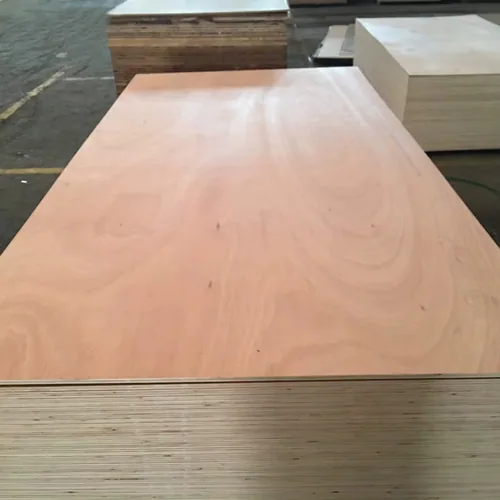
The ECQA report identifies 100% birch plywood at 2500 × 1250 mm in 21, 24 and 30 mm. Its sheet measurements help identify a panel for your working trial. Choose the construction and gauge, then send the cut-piece dimensions and the edge, groove or fitting you need to check.
The recorded weights are for full sheets. The report uses CP for appearance; specify your required face/back grade and acceptable repairs with the sample request. The listed gauges are documented examples, and other constructions and working sizes can be requested.
Scroll horizontally to compare all columns.
| Nominal panel | Thickness readings | Measured sheet weight | Workmanship checked |
|---|---|---|---|
| 21 mm all-birch | 21.09 / 21.05 mm | 46.5 / 46.6 kg | 23 panels |
| 24 mm all-birch | 24.10 mm | 50.0 kg | 20 panels |
| 30 mm all-birch | 30.21 / 30.10 mm | 63.5 / 63.6 kg | 37 panels |
The inspection records 80 workmanship checks and a PASS conclusion. Keep the report alongside the panel description, and put your own workshop observations beside the identified working piece. The sheet-dimension records connect the report's 2500 × 1250 mm notation with the catalogue's 1250 × 2500 mm footprint and your cutting direction.
Read the ECQA panel inspection report · View thickness, moisture and weight checks
Keep the working piece connected at each handover.
- Choose and label the piece.
- Label the construction, thickness, format, visible face and grain direction before cutting.
- Keep the trial with the selected item.
- Keep the trial drawing, tools, fitting, finish and accepted result with the purchase item.
- Connect the production and shipment records.
- Add the actual production lot and final pack labels. The ECQA report notes pallet labels to be added at shipping.
Use the finished-panel inspection checks and quantity handover schedule to prepare that file. Keep a changed construction or drawing connected to the next order's selected revision.
Choose the gauge and send the working-piece brief.
Scroll horizontally to compare all columns.
| Selected item | Include with your request | Continue |
|---|---|---|
| 21 mm all-birch · 1250 × 2500 mm | Cut-piece size, component drawing, visible edge, preparation and finish. | Request the 21 mm working piece |
| 24 mm all-birch · 1250 × 2500 mm | Actual machined feature, fitting, measurement stage and sample dimensions. | Request the 24 mm working piece |
| 30 mm all-birch · 1250 × 2500 mm | Finished section, handling or assembly detail, cut direction and working size. | Request the 30 mm working piece |
| 21 mm all-birch material and lot file | Full veneer schedule, finished gauge and the required inspection/packing references. | Request the all-birch sample and lot file |
| 18 mm commercial · 1220 × 2440 mm | Birch face, poplar core and BB/CC reference; identify the reverse, full construction and finished trial. | Request the commercial sample and lot file |
Request a sample around the decision still open
Send the construction, thickness, required working-piece dimensions and the decision the trial must answer. Samples are free; courier freight is credited in full against your formal order. Custom sizes and other constructions can be included in the request.
Download the product-specific sample worksheet to keep the trial observations with the selected panel.
Send a sample brief that reaches the order
Use a separate record for arrival inspection
Sample approval sets the production reference. On arrival, record the delivered and inspected quantities and the decision on the lot in the 600-sheet receiving example and inspection ledger. Sampling principles are explained in the NIST acceptance-sampling introduction.
Issue one sample approval record
- Name the chosen sample, full construction and purchase-item revision.
- Record the accepted feature, actual result and trial drawing; list remaining checks separately.
- Name the person accepting the result and date the decision. Keep the labelled physical reference and its storage location.
- Carry that item revision into the production SKU schedule. Add actual lot and pack identities when assigned.
The approval output is a reproducible item reference. Use the receiving file for the delivered quantities and lot decision. Download the sample-to-receiving handover sheet.
Questions buyers ask
Does a small sample prove the whole shipment is consistent?
No. A small sample establishes the result for the piece evaluated. Use its construction and accepted feature in the production specification, then inspect the actual lot under the order’s agreed plan. See the receiving and lot-release record.
What if the proposed construction changes after approval?
List the changed fields and determine which observations need to be repeated. Issue a revised approval reference before ordering the alternative.
What must be recorded when the sample is machined?
Keep the parent board/sample identity, cut direction and piece location, trial part/drawing, process and finish. Retain raw readings and the specific accepted feature with that setup.
Should the sample approval name the future order item?
Yes. Record the purchase item and revision, full construction, sample ID, trial result and accepted feature. Add the actual production lot and bundle identities when those records become available.
Can 24 passing observations be written as 600 accepted sheets?
No. Record 24 passing observations and a separate decision for the 600-sheet lot under its agreed sampling plan. The receiving example reconciles 24 passing, four held and 572 unexamined sheets.
What happens when an equivalent-looking construction is offered?
List the changed source/material/process fields against the selected version. Review the affected trial and product requirements, retain the proposed alternative separately and update the chosen order version.
Can I choose a working sample using the recorded birch panel measurements?
Yes. The ECQA panel records give nominal gauges, thickness readings, sheet weights and workmanship sampling for 21, 24 and 30 mm all-birch plywood. Send the selected construction and sheet format with your working-piece dimensions, component drawing and intended trial.
Which references should follow the working piece into production?
Keep its full construction, sample and parent-panel identity, cut direction, drawing and finished trial with the selected purchase item. Connect the actual production lot, agreed inspection checks and final pack contents to that revision at dispatch and receiving.